PT
ES
AO
CV
MZ
ST
GW
Professional
Executive
Public Sector
Omnia
Evolution
To forecast the costs relating to the month, Vacation allowance, and Christmas allowance for the following year, you can calculate and process the cost accrual.
Cost Accrual Calculations
This option lets you forecast the costs relating to the month, Vacation Allowance, and Christmas Allowance for the following year, and this forecast can be exported to Accounting.
Cost Accrual calculations for the Christmas Allowance are performed based on the same year. For the Vacation Allowance, they are always calculated based on the following year.
The calculation of the days the employee will be entitled to next year for each item — vacation month, Vacation Allowance, and Christmas — is done the same way the entitlement days are calculated for the employee's record, that is:
For the vacation month and its allowance, the calculation corresponds to the following equation: total of the earnings set to be processed for those processing types / entitlement days per year set in the IRT x employee's entitlement days, calculated according to the previous point;
For the Christmas Allowance, the calculation is performed according to the following equation: total of the earnings set to be processed for that processing type / 30 x employee's entitlement days, calculated according to the previous point.
An increase percentage for budgeting purposes, entered on the Budgeting tab, can also be used. In this case, the amount obtained will be increased by that percentage.
Vacation Cost Accruals
The Cost Accrual option lets you forecast the costs relating to the month, Vacation Allowance, and Christmas Allowance for the following year, and this forecast can be exported to Accounting.
This proposed configuration for the twelfths-based posting of vacation expense accruals is based on creating a company with the Standard Company (PRIVA) – Portugal (SNC) template.
The proposed expense accruals to be posted are the twelfths of entitlement for the Vacation Allowance and the vacation month. The accruals' settlement will be posted through the actual payment of the Vacation Allowance and the days of vacation actually taken.
To configure vacation cost accruals, we recommend consulting the manual available on this topic.
There may be calculation differences (caused by absences affecting vacation, salary changes, etc.) between the amounts estimated in the Cost Accruals and the amounts reversed by this process, and it may be necessary to make adjustments at the end of each year.
Processing
To process the cost accrual, follow these steps:
Go to Human Resources | Payroll | Processing | Other | Cost Accrual;
Specify the year and month for the estimate;
Specify whether you want to include Fixed-term hires;
Specify whether or not you want to include the Christmas Allowance in the estimate calculation. Enabling this option shows two new columns in the results grid ("X-mas Allow." and "X-mas Allow. Chg."). If the calculations were already processed previously, they will need to be processed again to calculate the values for the new columns;
Specify whether or not you want negative settlements to be considered upon contract termination. With this option enabled, negative amounts arising from contract terminations will also be considered for the cost accruals;
When the contract starts in the accrual's calculation year and ends in the following year, you can enable the Fixed-term contracts (<=12m) option, which will consider the contract's entire duration. At the same time, you can enable the Distribute vacation days and assign twelfths up to the contract end date option in the IRT, so that the full contract period is considered when calculating the Vacation Allowance and vacation accrual;
Specify whether you want the vacation month amounts to be the same as the Vacation Allowance amounts. When this option is enabled, the amounts to consider for the vacation month's cost accrual are exactly the same as the amounts to consider for the Vacation Allowance's cost accrual;
For employees hired during the current year, and for whom this is the first accrual processing run, specify the accumulated amounts since the start of the year;
On the Budgeting tab, apply an increase to the forecast costs (optional);
On the Restrictions tab, filter the data by Employees, Categories, Brackets, Departments, and Work Locations (optional). On this tab, you can also set the exchange rates to use for the cost accrual calculation through an exchange rate grid. When values that have already been calculated are loaded, this grid will be populated with the exchange rates associated with those values. This grid is only shown if Multi-Currency Processing is selected in the Administrator's General Parameters;
Click Process;
Finally, click Save.
When you click Process, you can view the cost forecast for each employee on the Results tab. On the Cost Centers tab, you can view the same type of information shown on the Results tab, but grouped by the respective cost centers associated with the employees.
Details of the Parameters Used
Available with Service Release 5
To help interpret the results obtained, a grid detailing the options used to calculate the values — usually set in the Work Policy — is available through a drill-down on the Total column.
It also describes the start and end dates used to determine the contract's duration in months, as well as the entitlement days.
The Twelfths Factor column is shown when it's a monthly processing run.
Correspondence between the detail columns and the options in the IRT:
Considers Actual Months: IRT | Vacation | Considers actual months worked
Contract Duration Type: IRT | Employment Contracts | can be:
Considers fractions proportionally;
Considers only full months, specifying the minimum no. of days to consider a month.
Considers Contract End Date: Distribute Vacation/Christmas days and assign allowance twelfths up to the contract end date
Except for the Vacation Allowance: Except for the Vacation Allowance once a full calendar year of activity has elapsed
Twelfths Factor: Factor applied to obtain the monthly amount
Calculation Scenarios
The cost accrual calculation obtains the amounts in several ways, to accommodate the diversity involved in performing this type of posting.
The calculation of the earnings amount depends on the earnings configuration — for example, to calculate the Christmas Allowance amount, the system considers all the earnings set with the Calculate in: Christmas Allowance option enabled.
To simplify the calculation, we simulate using only the base salary.
To calculate the entitlement days, the settings in the Work Policy (IRT) and the settings in the Cost Accruals option are considered. The combination of these settings produces different results (as shown in the scenarios provided). Because of this, the following options change the calculation results:
Considers actual months worked (available under IRT | Vacation): when enabled, the vacation day calculation must consider 20 days for the first year and 22 days for the following years. If it is not enabled, 22 days are always considered;
Distribute vacation/Christmas days and assign allowance twelfths up to the contract end date (available under IRT | Employment Contracts): specifies how the calculation of vacation and Christmas Allowance entitlement days is determined. The resulting twelfths assignment is performed up to the contract's end date or the end of the calendar year;
Except for the Vacation Allowance once a full calendar year of activity has elapsed (available under IRT | Employment Contracts): this option overrides the behavior of the previous option once a full calendar year of activity has elapsed since the hire date (the calendar year runs from January 1 to December 31);
Fixed-term contracts (<=12m) consider the entire duration (Vacation and Holiday Allowances): when enabled, and for employees with contracts of 12 months or less (where the hire year differs from the contract end year) whose contract end date falls in the calculation year (2024), the system will calculate as if the employee had been hired in 2025, i.e., it adds one year to the hire date and to the contract end date, applying 2 days for each month worked;
Accumulated for Hire Year (Vacation Allowance and vacation month): when enabled, all previous months are accounted for in the hire month, i.e., the calculation is performed by dividing by 12 and multiplying by the number of months up to the hire month. For employees hired during the year, when this option is selected, the annual amount/12 is always applied for twelfths, even in the months after hiring.
Note: for the Monthly Accrual, the month of December may show slight differences in the amount, due to the annual adjustment.
Below are examples and the corresponding scenarios for applying these options:
Base values used in all scenarios
No. of days for calculating the Vacation Allowance (VA) and vacation month: 22, or 20 in the hire year;
No. of calculation days for the Christmas Allowance (CA): 30;
Minimum no. of days to consider a month equal to 10 days (setting available under IRT | Employment Contracts);
Salary: €2,200.00;
Accrual processing for the year 2024.
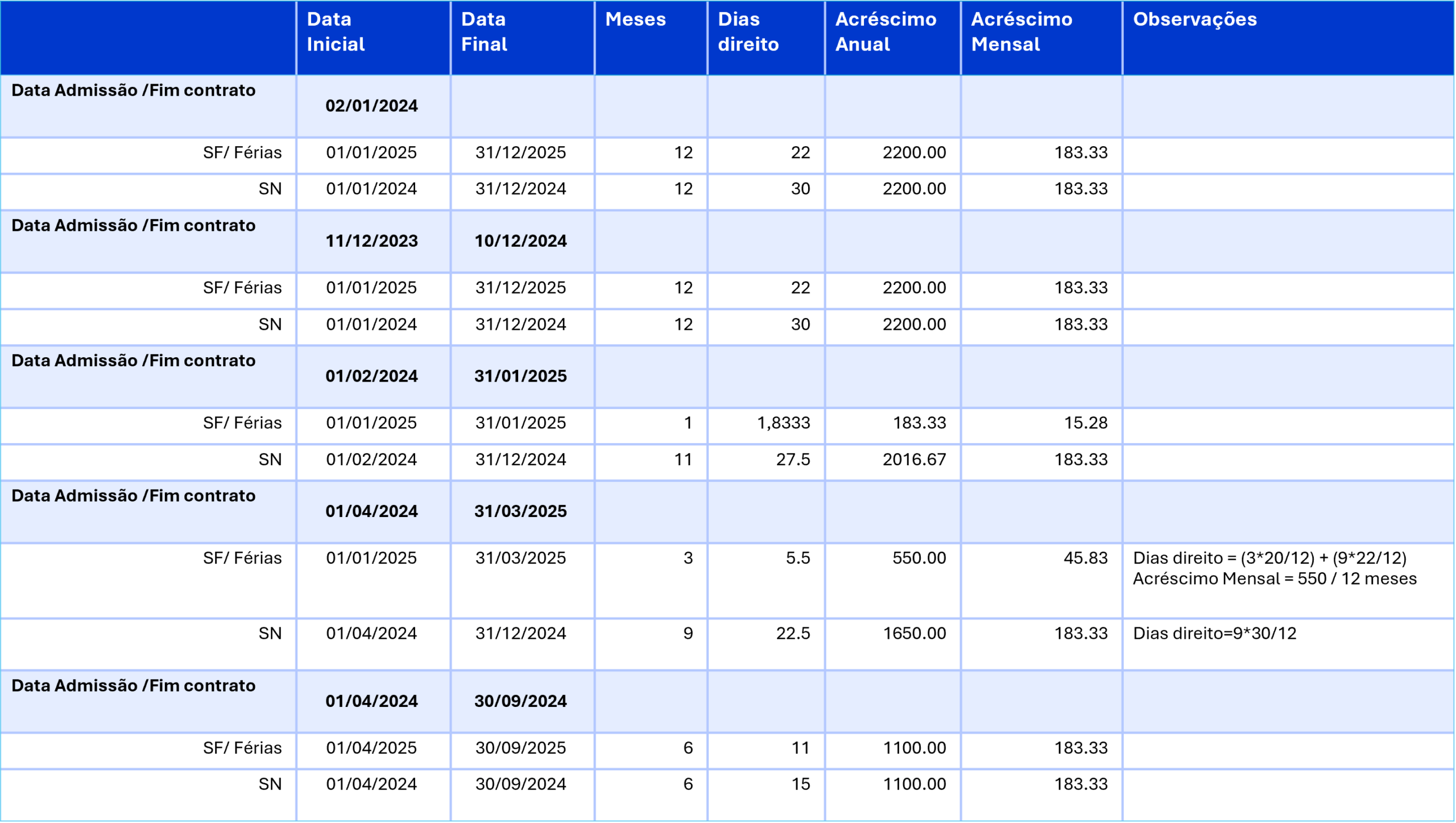
Option 1: "Considers actual months worked" not enabled for the vacation calculation
1) Consider the following options enabled (under IRT | Employment Contract):
Considers fractions proportionally
Distribute Vacation/Christmas days and assign allowance twelfths up to the contract end date
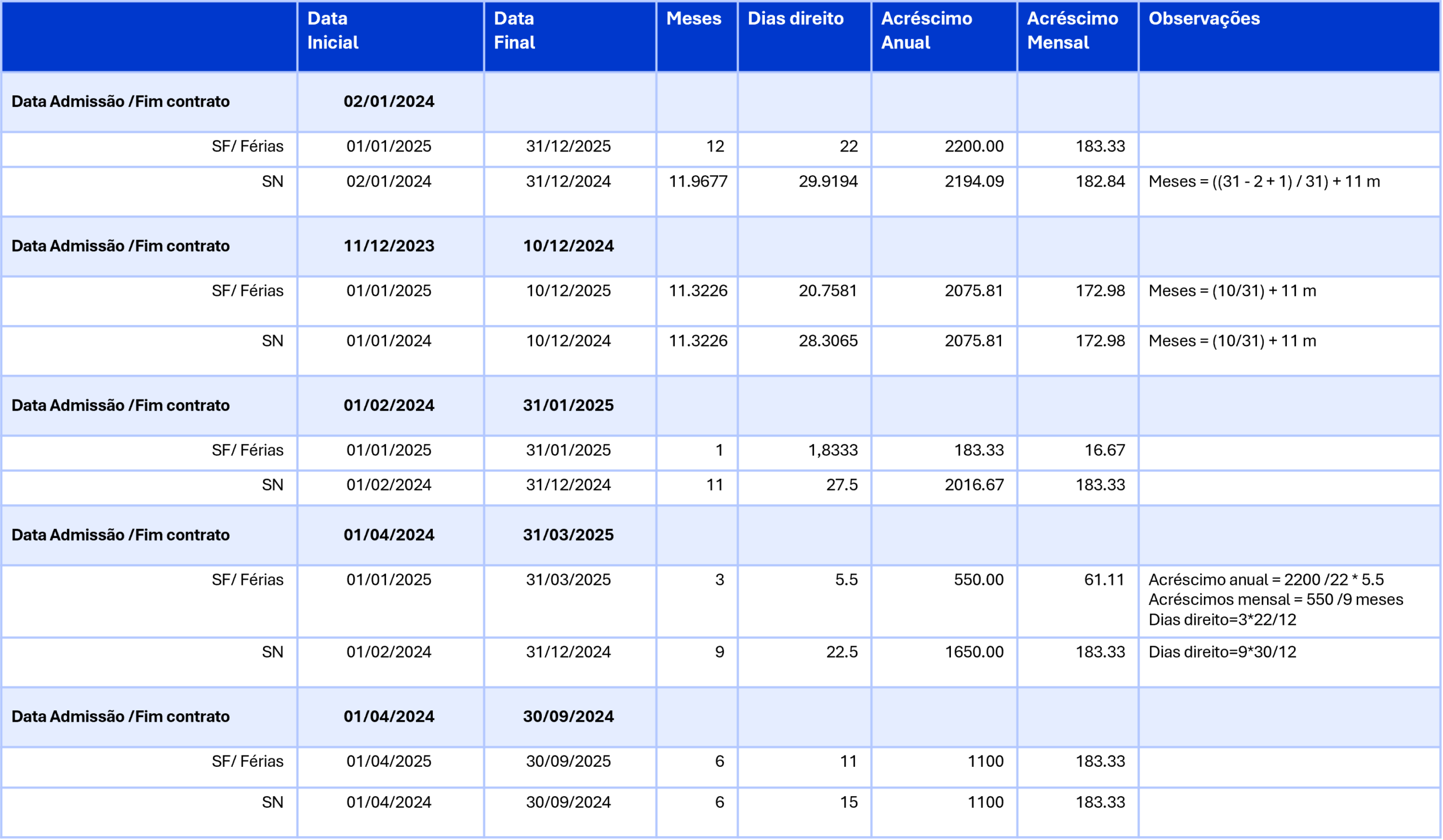
2) Consider the following option enabled (available under IRT | Employment Contract):
Considers fractions proportionally
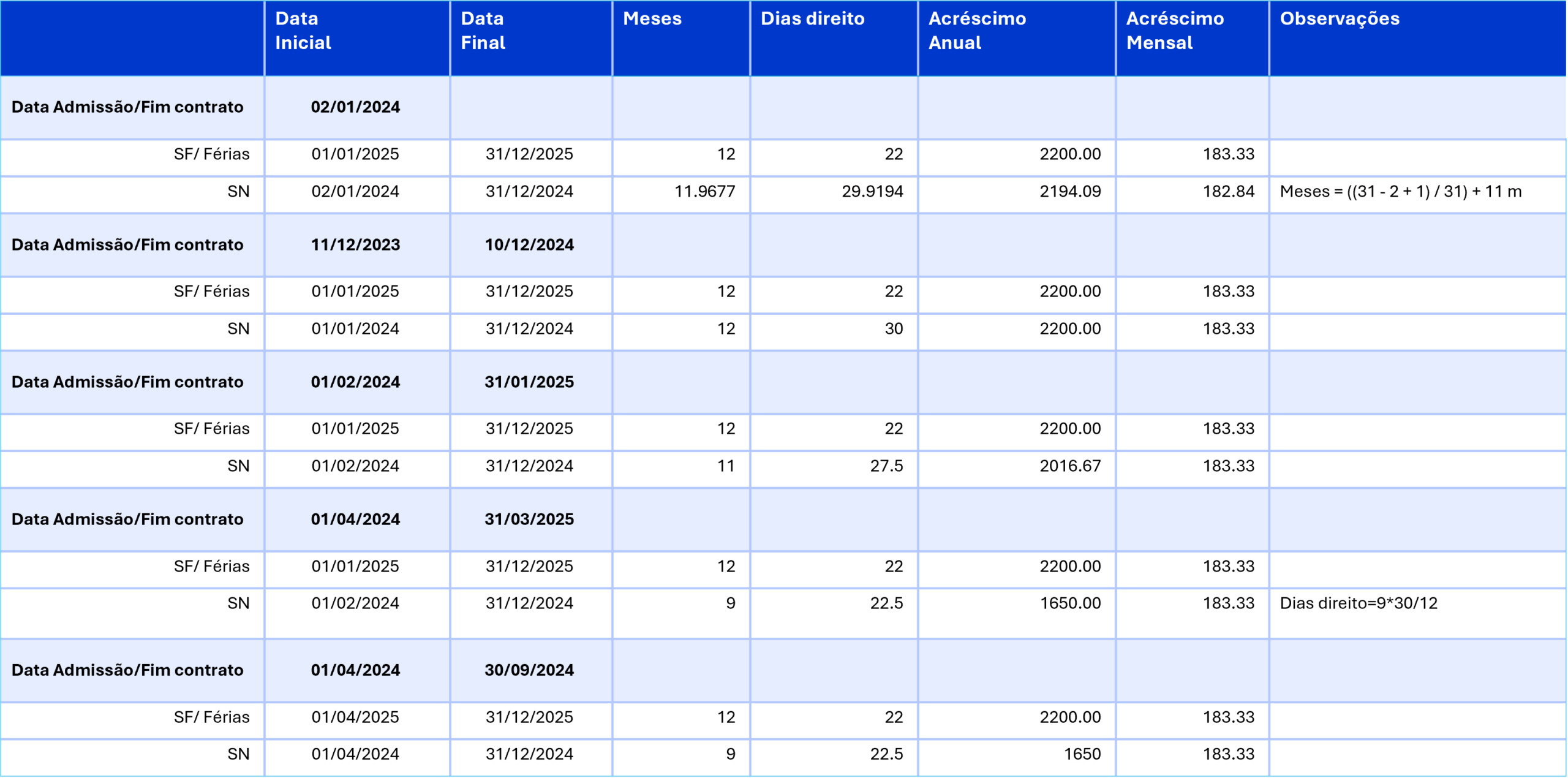
Option 2: Yes, "considers actual months worked" for the vacation calculation
1. Consider the following options enabled (available under IRT | Employment Contract):
Considers fractions proportionally
Distribute Vacation/Christmas days and assign allowance twelfths up to the contract end date
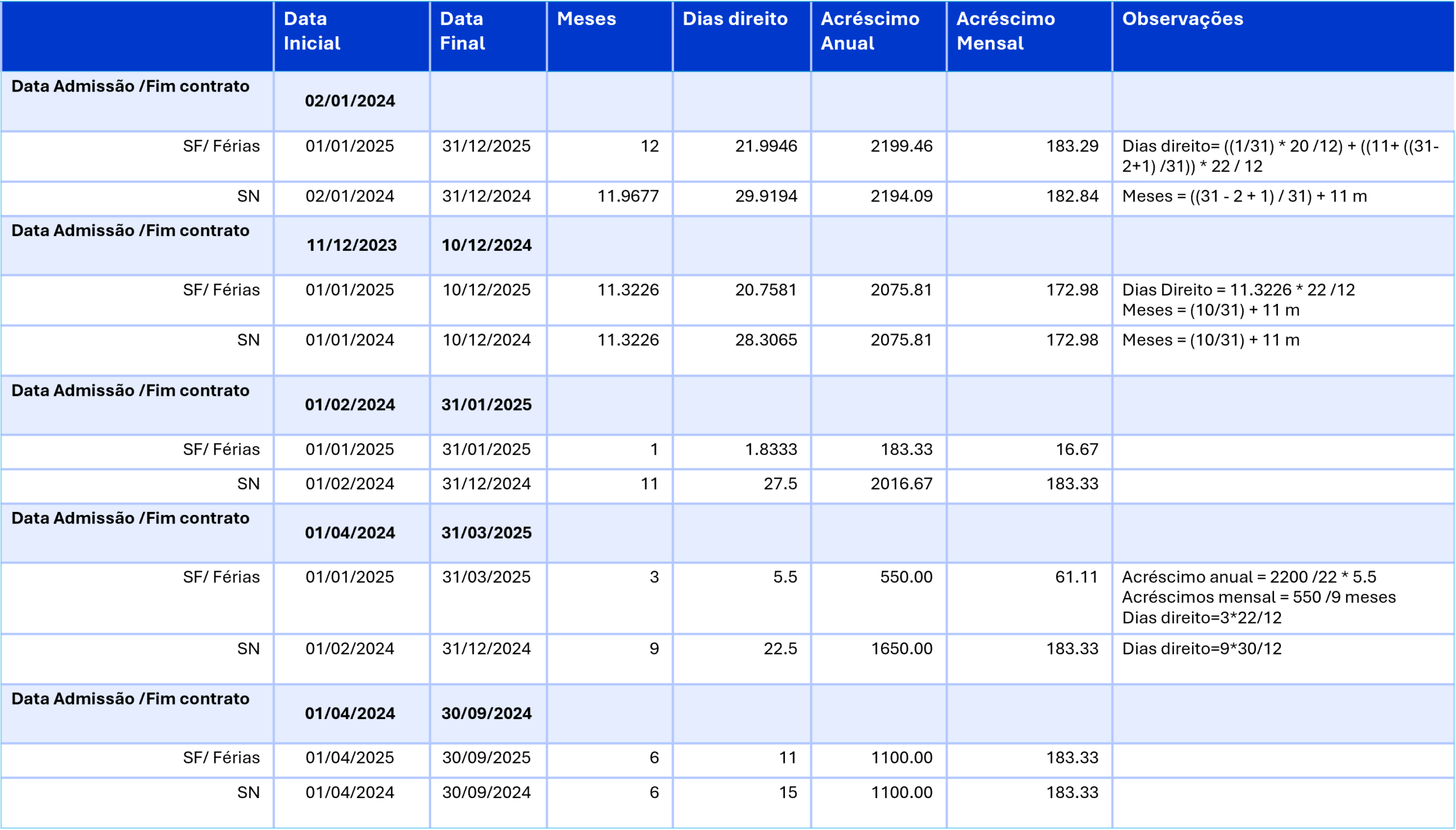
2. Consider the following option enabled (IRT | Employment Contract):
Considers fractions proportionally
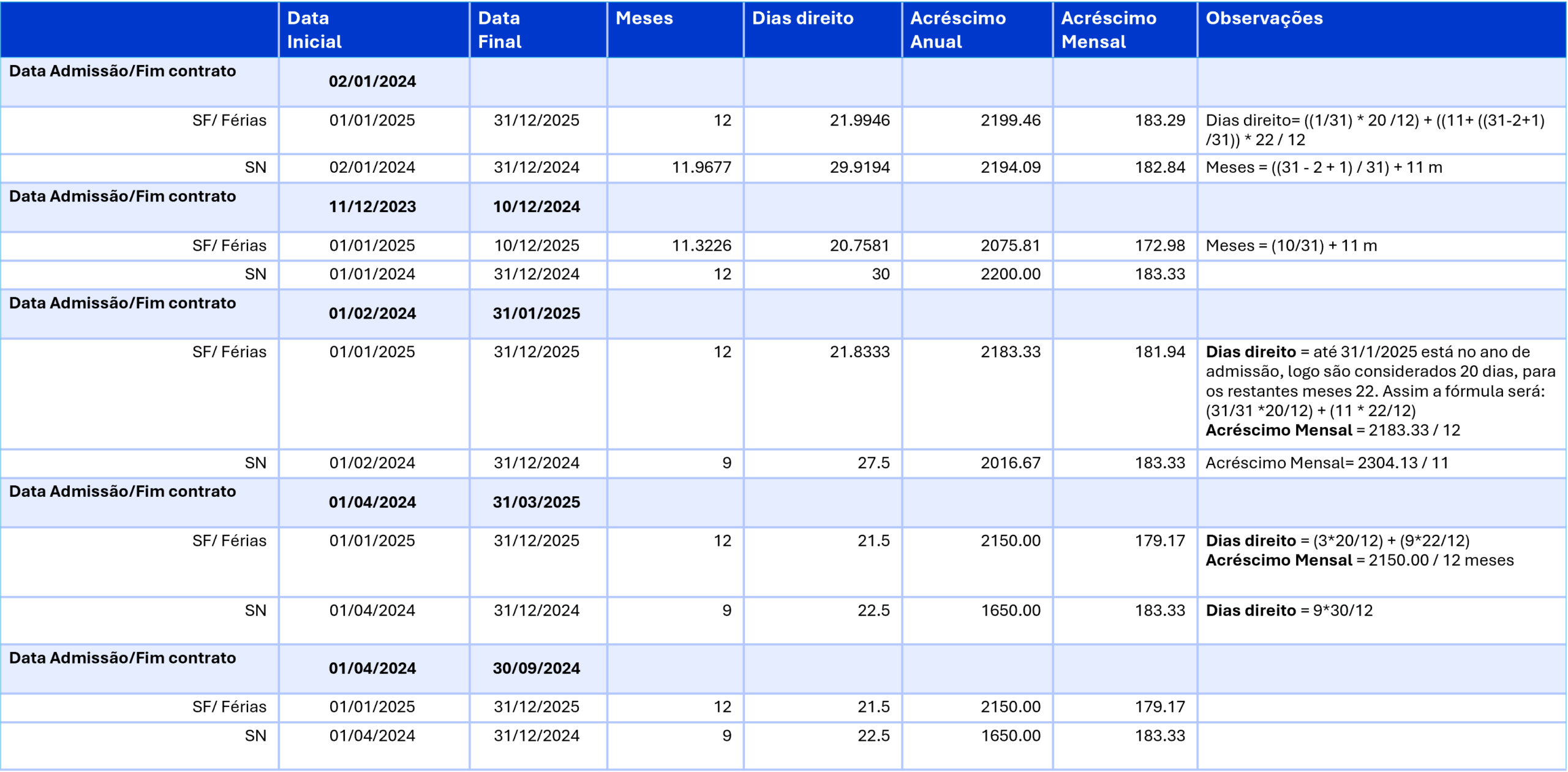
3. Consider the following options enabled (IRT | Employment Contract):
Considers fractions proportionally
Distribute Vacation/Christmas days and assign allowance twelfths up to the contract end date
Except for the Vacation Allowance once a full calendar year of activity has elapsed
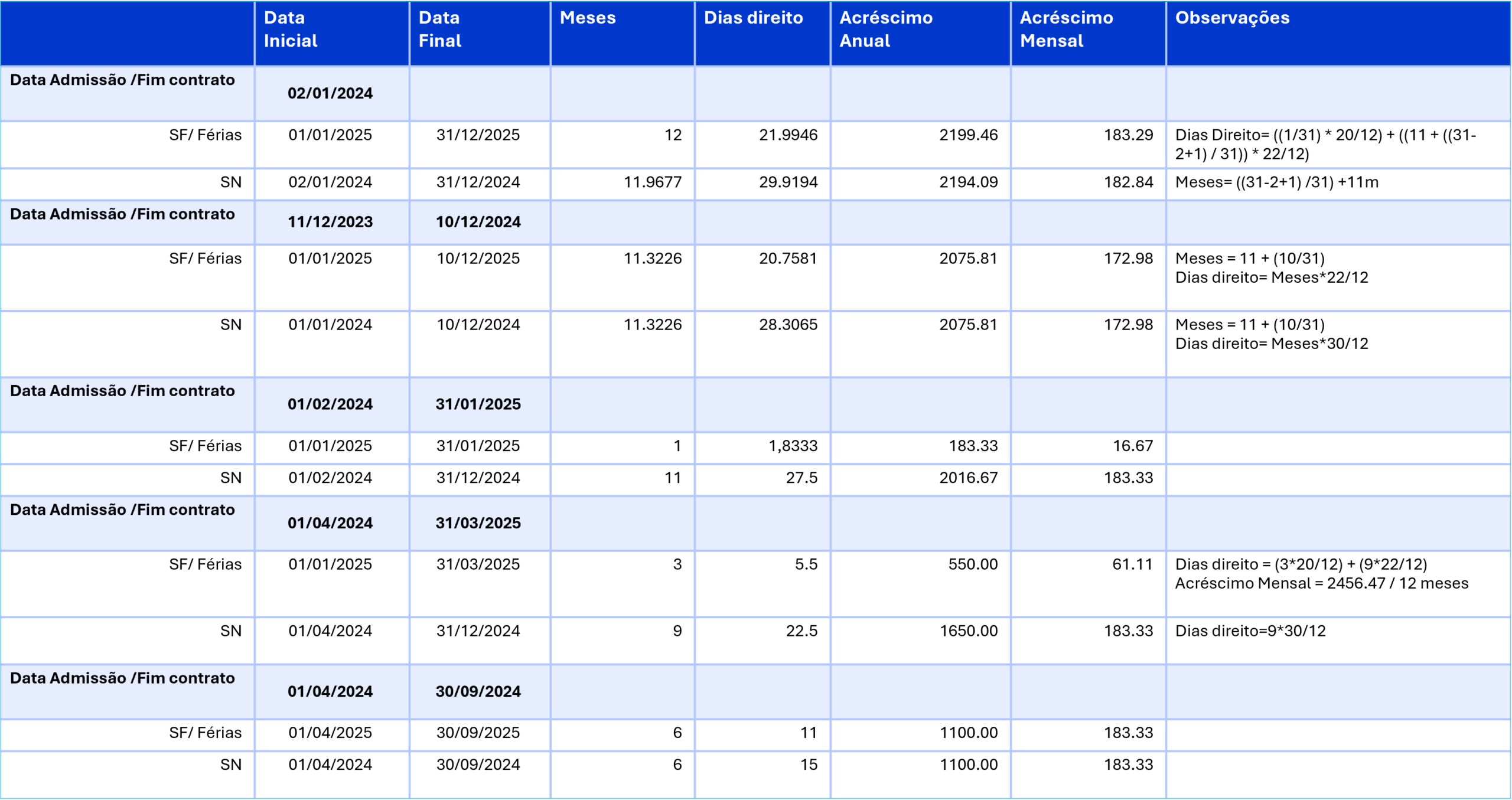
Option 3: Cost Accruals considers the option "Fixed-term contracts (<=12m) consider the entire duration (Vacation and Holiday Allowances)"
Consider the following options enabled (available under IRT | Employment Contract):
Considers full months (minimum no. of days to consider a month equal to 10)
Distribute Vacation/Christmas days and assign allowance twelfths up to the contract end date
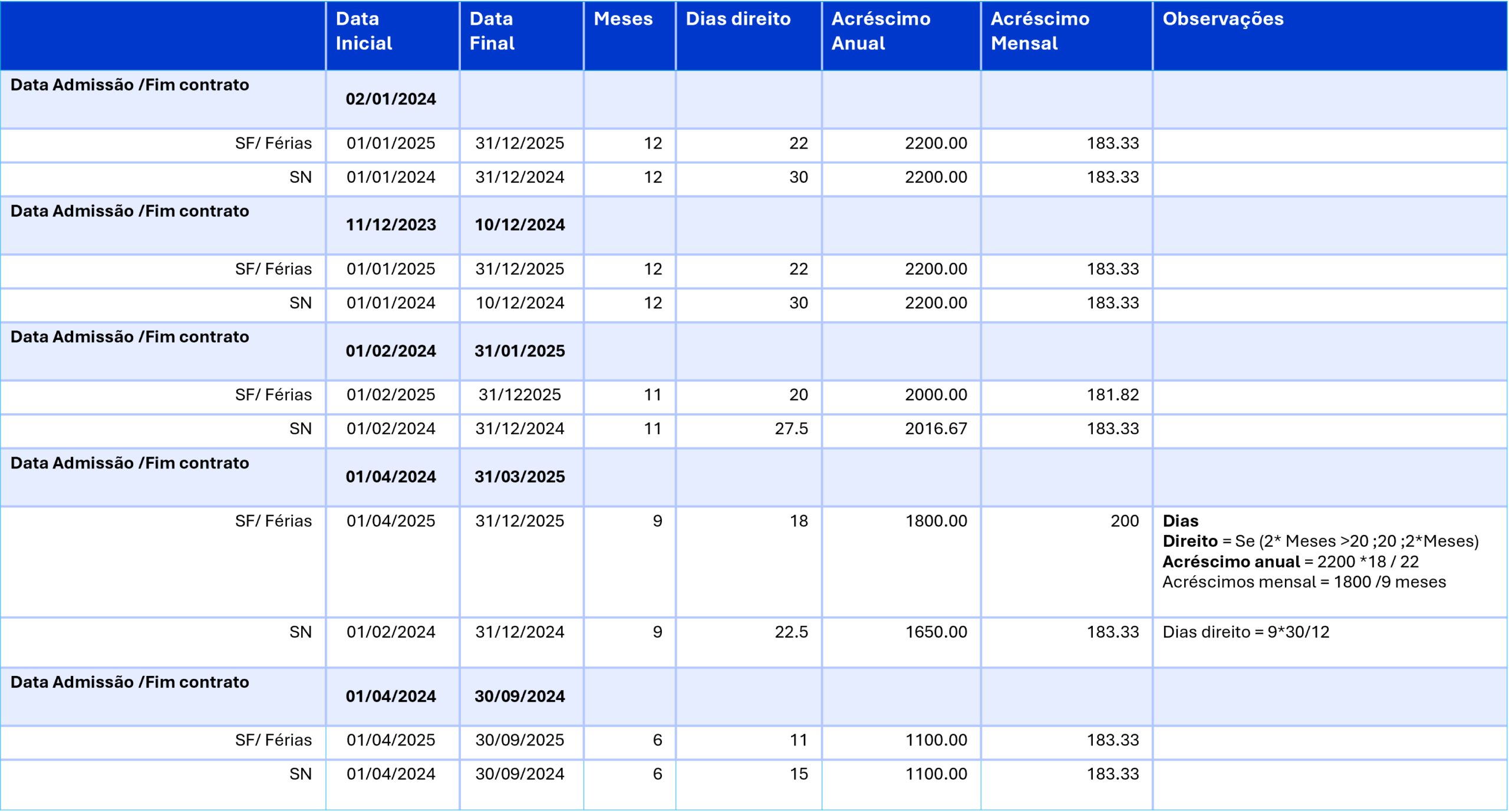
Option 4: Cost Accruals considers the option "Accumulated for Hire Year (Vacation Allowance and vacation month)"
Consider the following options enabled (available under IRT | Employment Contract):
Considers full months (minimum no. of days to consider a month equal to 10)
Distribute Vacation/Christmas days and assign allowance twelfths up to the contract end date